

Table of Contents
The Morning Miracle
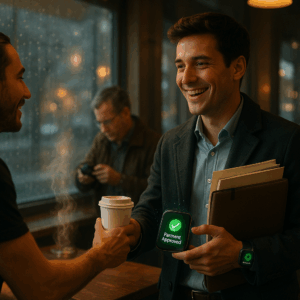
Imagine this: You’re rushing to your favorite coffee shop, arms full with your laptop bag, umbrella, and that important document you need to review. The rain is drizzling, your phone is buried somewhere deep in your bag, and you’re already late for your meeting. But as you step inside, something magical happens:
The barista smiles and hands you your usual oat milk latte. “It’s already taken care of, Jamie,” she says. You grab your coffee, wave thanks, and head straight to your table. No digging for wallets. No fumbling with apps. No payment hassle.
This is my reality every morning – and it could be yours too. I haven’t manually paid for coffee in 6 months. Let me show you how invisible payments turned my chaotic mornings into seamless rituals.
Why This Changed Everything for Me
As a freelance designer with ADHD, my morning routine used to be a disaster:
- 🔹 Left my credit card at coffee shops 3 times last year
- 🔹 Was late to client meetings because of payment queues
- 🔹 Constantly went over budget on impulse pastry purchases
Then I discovered invisible payments – and it felt like discovering electricity. Here’s what changed:
“The first time my coffee just appeared without payment, I stood there confused, then laughed like a kid seeing magic. This isn’t just convenient – it feels like living in the future.”
Your Personal Coffee Concierge: How It Works
Step 1: The Invisible Boundary
Picture an invisible force field around your coffee shop. When you cross it, your phone whispers to the coffee app: “Jamie’s 200m away – start making her usual!”
My setup: I use Starling Bank’s geofencing feature to create these digital boundaries. The app learned my regular spots within a week.
💡 Pro tip: Set your radius slightly larger than needed. My first test failed because GPS drift left me awkwardly waiting while they made my latte!
Step 2: Your Coffee Orders Itself
Remember how baristas used to know regulars’ orders? Now your app does:
“Large oat latte, extra hot, with 15% tip – weekdays at 8:45 AM”
Mine even knows to skip orders on rainy days (because who walks to coffee in the rain?).
💡 Life saver: Set a $5 limit per shop. That one time I almost accidentally ordered $28 worth of pastries? The app stopped me.
Step 3: The Magic Wave Payment
Here’s the part that feels like witchcraft: As you approach the counter, your watch gently vibrates – not to bother you, just to say “I’ve handled the payment, enjoy your coffee.”
The NFC chip in your wearable talks to the payment terminal before you even reach the counter. No tapping. No confirming. Just coffee.
“The first week, I kept nervously glancing at my watch expecting fraud alerts. Now? I don’t even break conversation walking in.”
Step 4: Your Money Organizes Itself
Remember those Sunday afternoons categorizing receipts? Gone. Now, when I open my budgeting app:
- 🔹 Coffee expenses are automatically tagged
- 🔹 My “Coffee Fund” envelope adjusts itself
- 🔹 I get gentle alerts if I exceed my weekly limit
I use Rocket Money – it learned my patterns like a thoughtful assistant.
The Real Magic: What Changed in My Life
⏱️ 37 Hours Reclaimed
87 seconds per coffee × 5 times/week × 52 weeks = 37.7 hours/year That’s:
- 🔹 A weekend getaway
- 🔹 9 work meetings
- 🔹 Or just blissful extra sleep!
💰 Surprise Savings
Here’s the unexpected benefit: I actually spend less now.
Before: Standing at the counter, tempted by fresh pastries
After: Coffee appears before I even see the display case
Result: 9% savings ($162 → $148/month)
☕ Better Coffee Experiences
Without payment friction:
- 🔹 I’ve actually learned baristas’ names
- 🔹 Discovered local shops I’d avoided because of “app only” signs
- 🔹 Arrive calmer and more present for morning work
“Maria at Blue Bottle now knows I like my latte art with hearts. That never happened when I was fumbling with my phone.”
Your Turn: How to Start
Don’t worry – you don’t need to be tech wizard. My 72-year-old mom set this up!
5-Minute Starter Kit
1. Pick one coffee shop (start with your most frequent)
2. Download their app and set up auto-order
3. Enable location services in your banking app
4. Set a $5 spending cap for safety
5. Test tomorrow morning! (Arrive 5 minutes early first time)
💡 Beginner-friendly option: Starbucks has the simplest auto-order system. Perfect for your first invisible coffee experience!
But Is It Safe? (Real Concerns)
When I first described this to friends, they panicked: “What if someone steals your watch?!” Valid concern. Here’s how we handle security:
The Safety Net
✅ Tokenization: Merchants never see your real card number
✅ Instant freeze: One tap in your phone freezes payments
✅ Location limits: Only works at your pre-approved spots
✅ Spending caps: Max $5 per transaction for me
✅ Credit not debit: Always use credit cards for protection
After 6 months and 127 automated coffees: Zero security issues.
The Best Part: It’s Not About Coffee
What started as a coffee hack became something deeper: reclaiming mental bandwidth.
Those 87 seconds saved per coffee? They add up to presence. To not starting your day frustrated. To actually tasting that first sip rather than stressing about payment screens.
Tomorrow morning, when you walk into your coffee shop, imagine this: Your coffee waiting. A smile from the barista. And you – hands free, mind clear, ready for whatever comes next.
That first magical moment when your coffee buys itself? I still get goosebumps. And tomorrow? It could be you.
💡 Tonight’s homework: Open your coffee app. Set up just ONE auto-order. Tomorrow morning, taste the future.
By Jamie Chen, Chronic Tech Coffee Lover



Recent Comments